Charge Families Only When the Class Runs
Avoid minimum enrollment refunds: charge families only once a class reaches its minimum. How request, offer, accept and charge work, and a cancellation policy.
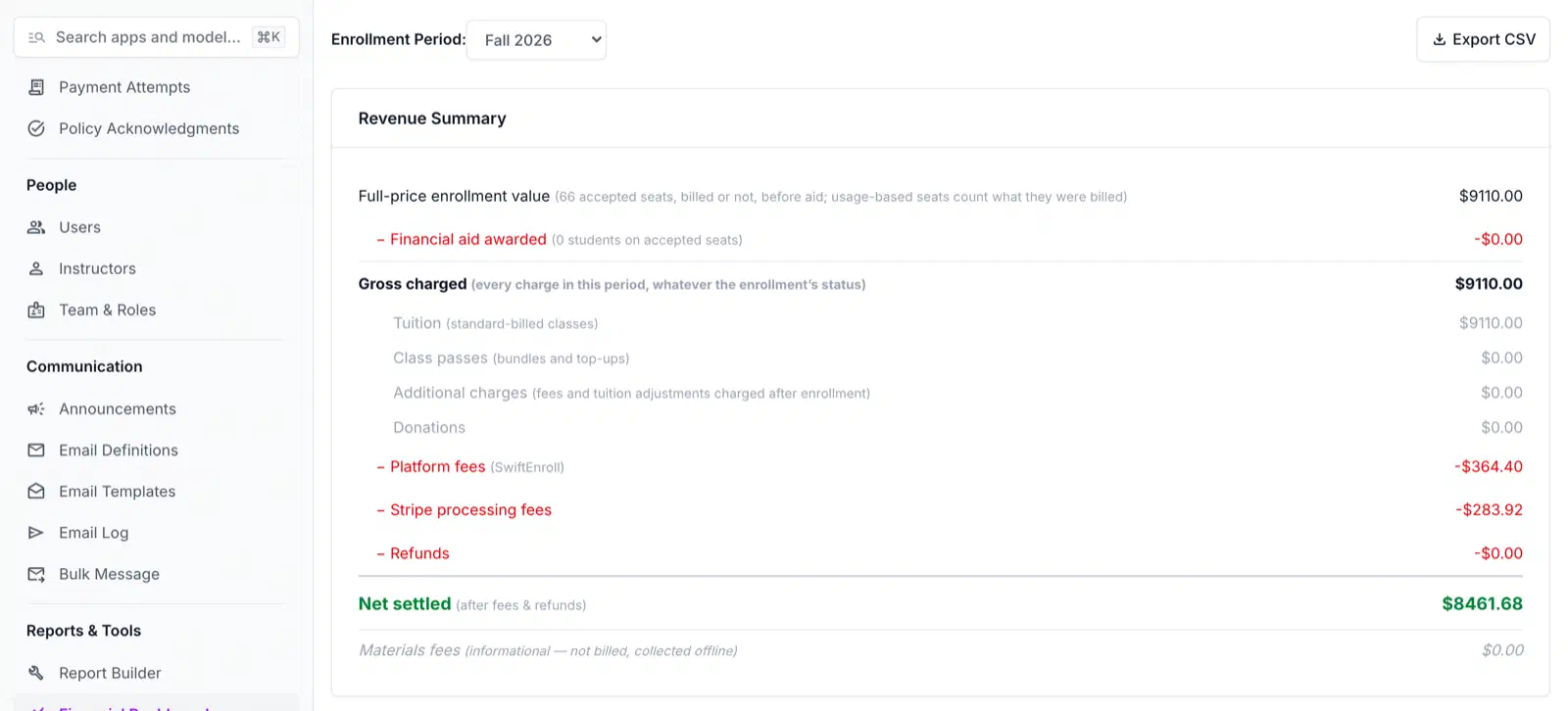
Table of Contents
Picture the week before a session starts. Twelve families signed up for Tuesday Ukulele, and the instructor needs eight to make the class worth running. You have five. If every family paid at signup, cancelling the class means five refunds, five apology emails, and a reconciliation that no longer matches the roster.
The cleaner fix is to change when the card is charged. This guide explains why charge-at-signup creates refund work, how charging after confirmation works in SwiftEnroll, and what to put in your cancellation policy.
The refund problem with charge-at-signup
Most registration tools take payment at checkout. That is simple when every class fills. It becomes a cost when one does not.
- Undersubscribed classes become refund batches. Each family you charged must be refunded one at a time, and each one is a chance for a mistake.
- Processing fees are not returned. Stripe’s own documentation says that for refunds, “Stripe’s processing fees from the original transaction aren’t returned”. The program absorbs that fee on every refunded payment.
- SwiftEnroll’s platform fee is not refunded either. When you give a family the whole charge back, your program’s Stripe balance covers it.
- Families wait. A refund takes time to reach a card, so the family who just lost a class also waits on their money.
A charge you never made needs no refund. That is the whole idea.
How charging after confirmation works
SwiftEnroll saves a family’s card to their wallet, and requesting a spot does not charge it. What happens next depends on how the program fills classes.
Lottery and waitlist programs
- Request. A family submits a request. It sits as submitted. Nothing is charged, because a request has no seat yet.
- Offer. When the draw or a waitlist promotion gives the family a seat, it becomes an offer. The family has until the acceptance deadline you set, if you set one. Nothing is charged yet.
- Accept. The family accepts. Now the seat is theirs, and the class’s minimum is checked.
- Charge. If the class has already reached its minimum, the card is charged straight away, and the family sees the amount and the card. If it has not, the family is told they will be charged once the class reaches its minimum, and the charge waits.
This is the flow in a lottery program. The lottery guide covers the draw that produces the offers.
First-come, first-served programs
When a seat is available, the family is accepted at sign-up, and the same minimum rule applies: charged now if the class has reached its minimum, deferred if not. A family who joins a full class’s waitlist may be enrolled and charged automatically when a seat opens, if they agreed to that when they joined and the program has that setting on. Otherwise they get an offer to accept.
How minimum enrollment works
Each activity has a minimum number of students, and an individual class can set its own. A class cannot have a minimum above its capacity. SwiftEnroll refuses that setting, because such a class would never charge anyone.
Two details matter when you plan around it:
- Only accepted seats count. An offer that a family has not accepted does not move the class toward its minimum. This is why a lottery with generous offers can still leave a class under the line.
- The seat that crosses the line triggers the rest. When an acceptance brings a class to its minimum, SwiftEnroll charges every other accepted seat in that class that has not paid, at that moment. A family with no card on file is emailed and asked to add one.
Seats with a pending financial aid decision are held until the decision is made, so nobody is charged an amount that aid may change.
When a class never fills
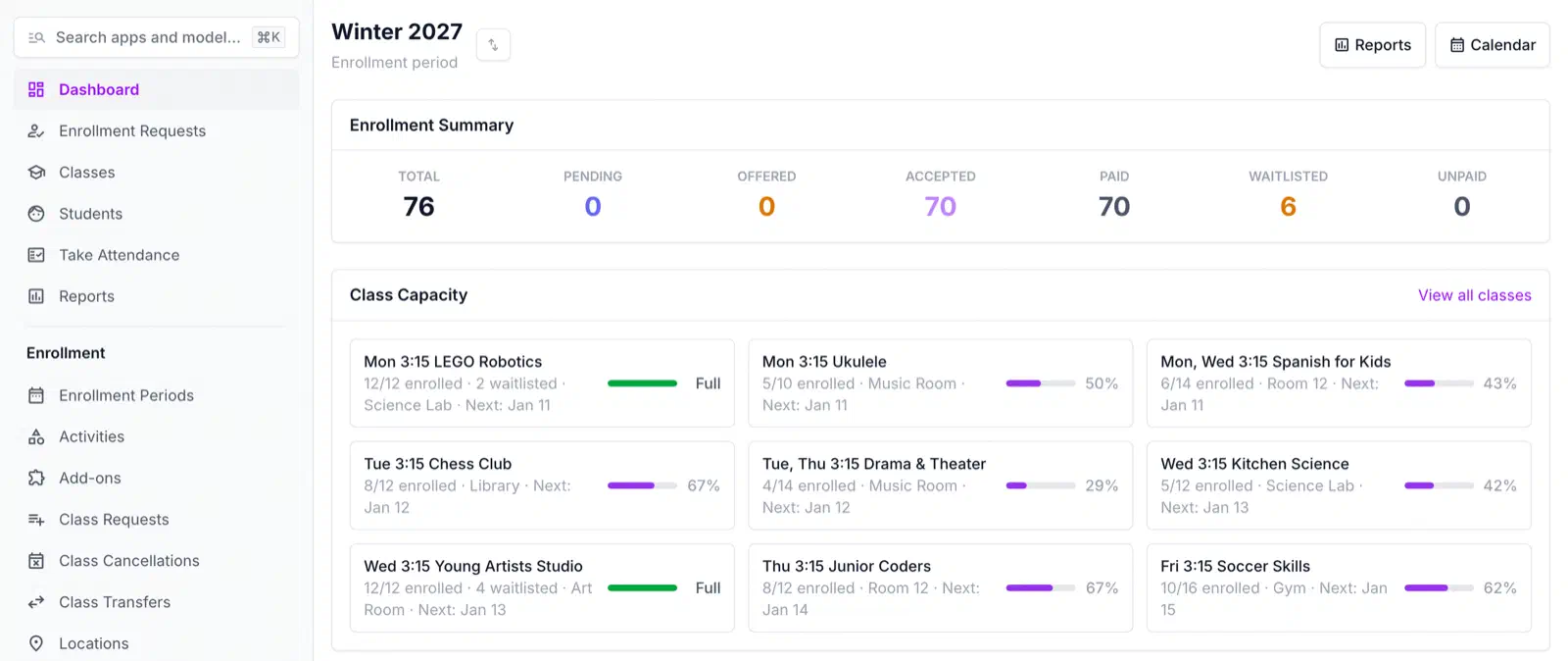
The admin home page warns you about classes below their minimum while the period is active. Whether each one runs is your decision.
If you drop a class where nobody has paid, the class and its sign-ups are removed, and each family is emailed. Families whose seat was never charged are told they will not be charged for it. SwiftEnroll refuses to drop a class that has any paid seat, so you cannot delete one with money attached by accident. For a class where people did pay, the refund tools apply.
The result is the point of the design. For a class that never reached its minimum, there is nothing to refund and nothing to reconcile.
If a card fails
A failed charge does not undo the acceptance. The seat stays accepted and unpaid, and the family is told there was an issue with their payment and is asked to update their payment method. They can retry from their enrollment page, where seats with a failed payment are listed under Needs your attention. On your side, the seat shows in the Unpaid count.
Failed payments are logged in the payment attempts list, so you see a failed charge before the first day of class.
What your treasurer sees
Charging later only helps if the books stay readable. Every enrollment period has a financial dashboard with these lines:
- Full-price enrollment value
- Financial aid awarded
- Gross charged
- Platform fees and Stripe processing fees
- Refunds
- Net settled
You can see them class by class, and export them to CSV. A class below its minimum shows its seat count with a “not charged yet” note, and its revenue columns stay at zero until it fills. That is what you want to see: a class that has not run has not collected anything.
For the full billing picture, including refunds, financial aid, and class passes, see billing and payments.
What the charge covers
The charge is the class price, less any discount or financial aid, and it runs once the class is confirmed. Classes billed with class passes work differently: families buy a bundle, and no tuition is charged.
A cancellation policy paragraph you can adapt
Families accept a minimum-enrollment rule when it is written down and specific. SwiftEnroll has a refund policy field and a class cancellation policy field in Program Configuration, both shown to families on the FAQ page. The text is yours, and the system does not enforce it. Here is a starting point:
[Program Name] classes need at least [N] students to run. Requesting a spot does not charge your card. When you accept an offered spot, your card is charged once the class has reached its minimum enrollment, and not before. If a class has not reached its minimum by [date], we will cancel it, you will not be charged, and we will email you about other options. After you are charged, refunds follow our refund policy: [your terms]. Card processing fees [are / are not] returned on refunds.
Fill in the date, and decide the fee line deliberately. When you refund a charge, SwiftEnroll shows you the Stripe and platform fee breakdown and lets you choose whether to refund the fees too. If you tick it, your program covers the difference. Say in the policy which you will do.
Camps and short sessions
Minimums matter most where classes are short and the stakes are high. A cancelled week of camp can mean refunds to a dozen families at once. Charging after confirmation means an undersubscribed week costs you a cancellation email. See summer and break camps for how camps use it, and after-school enrichment programs for the term-long version.
If you are weighing the cost of running this way, the pricing page lists the per-registration fee and the plans.
Stop refunding classes that never ran
See request, offer, accept and charge on a real enrollment period, including a class below its minimum.
See billing and paymentsMinimum enrollment and refund questions
Related Articles
Enrollment Lottery Software: A Fair-Draw Guide
Enrollment lottery software explained: when a lottery beats first-come, how ranked choices and the draw work, and how to tell parents the process is fair.
Afterschool Enrollment Software: Set Up Payments First
Configure your afterschool enrollment software before registration opens: installment plans, financial aid, and sibling discounts that cut refund churn.
Youth Program Registration Forms: What Parents Actually Abandon
Most youth program registration forms lose families mid-way. Here's what to ask, what to skip, and how to build a form parents actually finish.
See your next season on SwiftEnroll
Twenty minutes with Joe, your real class list, no slides.